Hytale: Connect to Server
In this article
Join by adding the server to your server list
- 1
- Go to your DatHost Control Panel
- 2
- Click Edit on your Hytale server
- 3
-
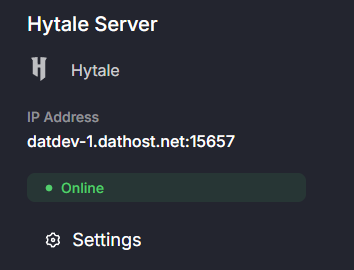
Copy the server IP address by selecting it and pressing Ctrl + C.
- 4
- Now, launch the Hytale game.
- 5
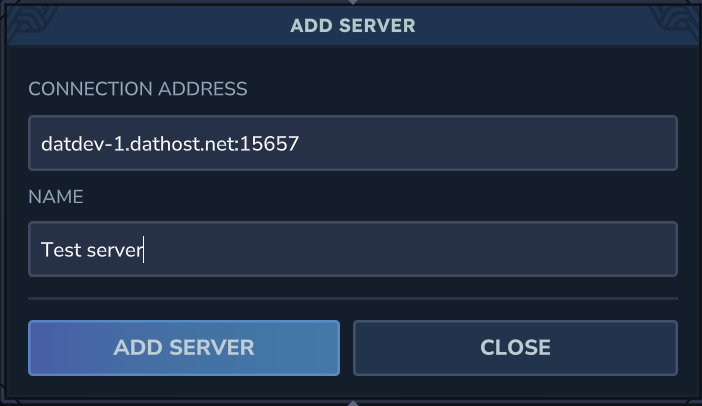
- Once in-game, click Server and then Add Server
- 6
-
Choose a name for your server, and paste the IP address you copied in step 3 into the Server Address field using Ctrl + V.
- 7
- Select the server in the list and click Join Server. Now you're ready to start exploring!
Join via direct connect
- 1
- Go to your DatHost Control Panel
- 2
- Click Edit on your Hytale server
- 3
-
Copy the server IP address by selecting it and pressing Ctrl + C.
- 4
- Now, launch the Hytale game.
- 5
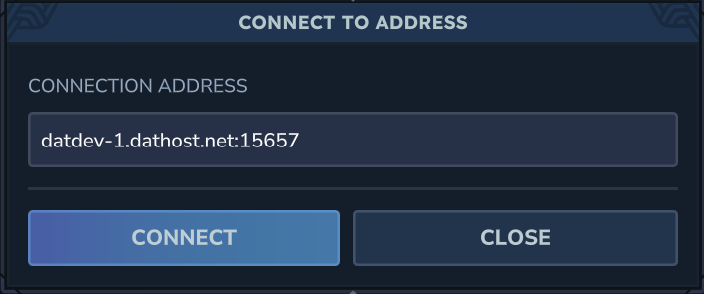
- Once in-game, click Multiplayer and then Connect to Address
- 6
-
Paste the IP address you copied in step 3 by using Ctrl + V.
- 7
- Click Join Server and start exploring!