Palworld: How to enable PvP on your dedicated server
This guide explains how to enable PvP (Player vs Player) on a dedicated server and how to tune the most important PvP-related settings for balance and performance.
Note: PvP is a trial feature and may not behave as expected.
In this article
How To Enable PvP
To enable PvP, enable the following settings in your server Settings tab:
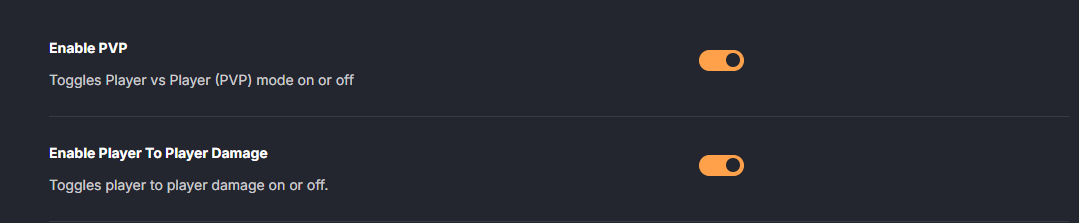

What changes when PvP is active
- Players can harm each other.
- Base Pals will engage hostile players that trespass into your base.
- All damage received by airborne players and ride Pals is increased.
- Damage dealt by players to summoned and base Pals is reduced.
- Players can access chests owned by other guilds.
- Melee damage dealt to structures built by other players is reduced.
- Base Pals will engage enemies over a wider area.
- The minimum distance between bases is increased (bases must be placed farther apart).
- The distance at which player names and damage values appear is changed.
- A notification is sent when your base comes under attack, and you won’t be able to build or repair inside the base during the battle.
- Some weapons have their range and damage tuned for PvP.
Recommended Server Settings When Enabling PvP
PvP typically benefits from restrictions that reduce "escape" mechanics, limit power creep, and prevent heavy server strain. Below are the recommended settings by PocketPair and why you might want them.
Block player stat allocation
Prevents players from increasing HP and Attack, which can help keep PvP more balanced.

Individually disable technologies
Technologies that significantly affect PvP balance can be restricted, including fast-movement Pal Gear, the Grappling Gun, and Guild Chests.
DenyTechnologyList=("SkillUnlock_JetDragon", "SkillUnlock_IceHorse", "SkillUnlock_IceHorse_Dark", "SkillUnlock_SaintCentaur", "SkillUnlock_BlackCentaur", "SkillUnlock_DarkMechaDragon", "SkillUnlock_PoseidonOrca", "GrapplingGun", "GrapplingGun2", "GrapplingGun3", "GrapplingGun4", "GrapplingGun5", "GuildChest")With the list above, the specified Pal Gear and Grappling Guns are disabled. Check out this article for a full list of Technology IDs
Fast Travel restrictions
You can disable Fast Travel completely or limit it to travel between bases only. This prevents players from using Fast Travel to avoid combat.

With these settings, Fast Travel is limited to travel between bases only.
Prohibit escaping combat by logging out
When enabled, players remain in the world (lying down/sleeping) where they logged out. Logging out will no longer let players escape combat.

Starting location selection
Allow players to choose their starting location when beginning the game.

Disable gamepad aim assist
If you want to disable aim assist for controllers, set the following to False:

Death penalty settings
Configure death penalties and whether lost items can be picked up. These settings control whether players can take other players’ Pals or items.


With these settings, death causes all Pals and items to drop, making them available for others to loot.
Base area visualization
Make other players’ base areas visible:

Buildable area restrictions
Prevent building in certain important locations (such as player spawn points and other key spots).

Guild settings (limits)
Limit the number of players per guild and how many bases a guild can own. Since additional bases can increase server strain, these limits can help reduce load. 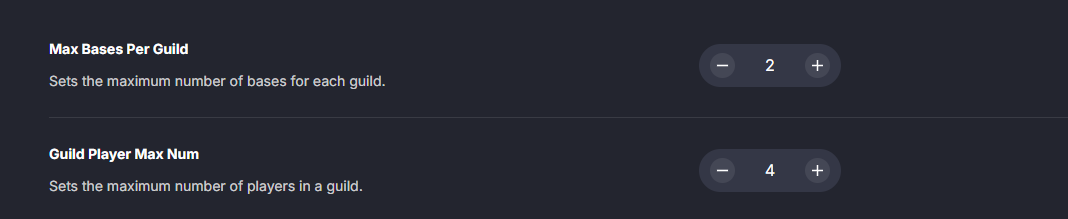
Structure count limit
Limit how many structures can be built to reduce server strain.

Example: each player can build up to 1000 structures.
Guild rejoin cooldown
Set a cooldown before a player can rejoin a guild after leaving.

Example: players can rejoin a guild again after 60 minutes.
Respawn settings
Configure respawn delay, penalty durations, and penalty scaling.
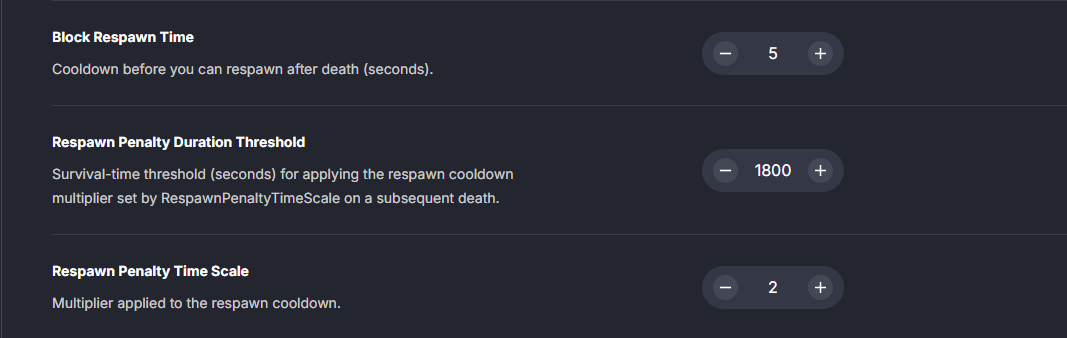
Example behavior: respawn time starts at 5 seconds and doubles with each death. If 1800 seconds pass without dying, the respawn time returns to 5 seconds.
PvP Rewards Settings
PvP rewards can be used for custom rules, such as "whoever gathers the most PvP items within a timeframe wins." You can configure whether killing a player drops a PvP item, which item drops, and how many. 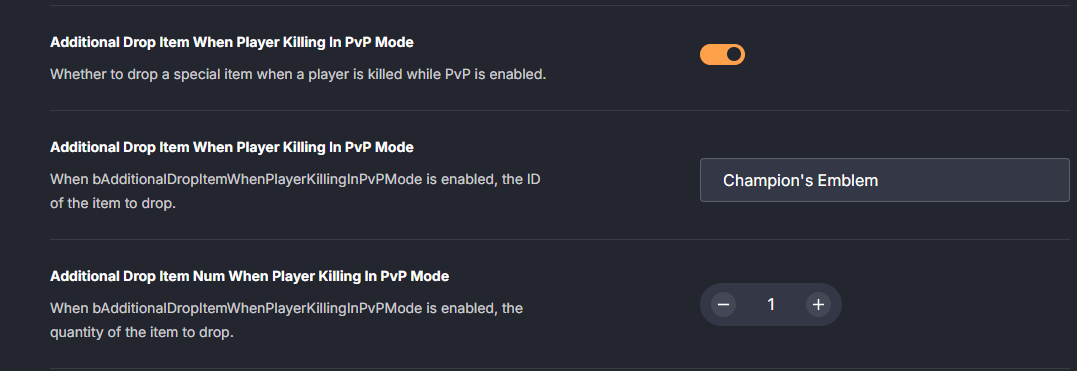 Example: a single Champion’s Emblem drops when a player is killed in PvP.
Optionally display PvP item counts on the world map:
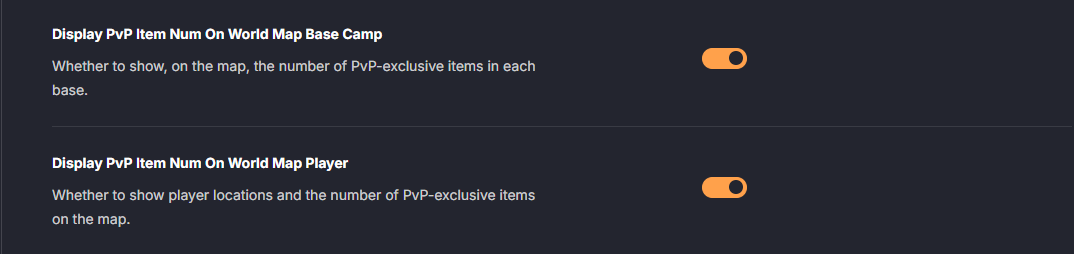
With these enabled, the number of Champion’s Emblems in each base and held by each player will appear on the map.
Quick Reference Guide
In the DatHost control panel, the relevant options are grouped under the following categories. Use this list when you want a clean overview of what to change and where.
| Category | Name | Recommended Value |
|---|---|---|
| Environment | Can Pickup Other Guild Death Penalty Drop | Enabled |
| Environment | Build Area Limit | Enabled |
| Gameplay | Max Building Limit Num | 1000 |
| Gameplay | Death Penalty | All |
| Gameplay | Enable Fast Travel | Enabled |
| Gameplay | Enable Fast Travel Only Base Camp | Enabled |
| Gameplay | Block Respawn Time | 5 |
| Gameplay | Respawn Penalty Duration Threshold | 1800 |
| Gameplay | Respawn Penalty Time Scale | 2 |
| Gameplay | Exist Player After Logout | Enabled |
| Guild | Max Bases Per Guild | 2 |
| Guild | Guild Player Max Num | 4 |
| Guild | Guild Rejoin Cooldown Minutes | 60 |
| Guild | Invisible Other Guild Base Camp Area FX | Enabled |
| PvP | Deny Technology List | |
| PvP | Additional Drop Item When Player Killing In PvP Mode (toggle) | Enabled |
| PvP | Additional Drop Item When Player Killing In PvP Mode (item) | ("Champion's Emblem") |
| PvP | Additional Drop Item Num When Player Killing In PvP Mode | 1 |
| PvP | Display PvP Item Num On World Map Base Camp | Enabled |
| PvP | Display PvP Item Num On World Map Player | Enabled |
| PvP | Allow Enhance Stat Health | Disabled |
| PvP | Allow Enhance Stat Attack | Disabled |